Implementing a customer relationship management (CRM) platform is a long process: discovery, configuration, data management and training. By go-live, many teams are ready to call the project done and get back to work. In actuality, this window is when the foundations that drive CRM adoption and long-term success are put to the test. Teams lose the plot when they skip the change management that comes after launch: the coaching, reviews and system fixes that turn a new portal into the way teams operate day in, and day out.
Across the CRM implementation, migration, and remediation projects the Digital Polygon team has worked on, the most successful projects shared one core trait: the project and client teams planned user adoption with the same rigor as the build.
Josh Curcio’s session “Fix CRM Adoption: A Blueprint for Complex Sales Teams” at HubSpot’s Unbound conference in September 2026 gave the problem a useful frame. It lines up closely with what our revenue operations (RevOps) team sees .
Most CRM projects start with the wrong ask
When clients come to Digital Polygon, the request usually sounds the same:
- Map our sales process and build it in HubSpot.
- Add new pipelines.
- Clean up the properties.
- Move us off the legacy system before the contract renews.
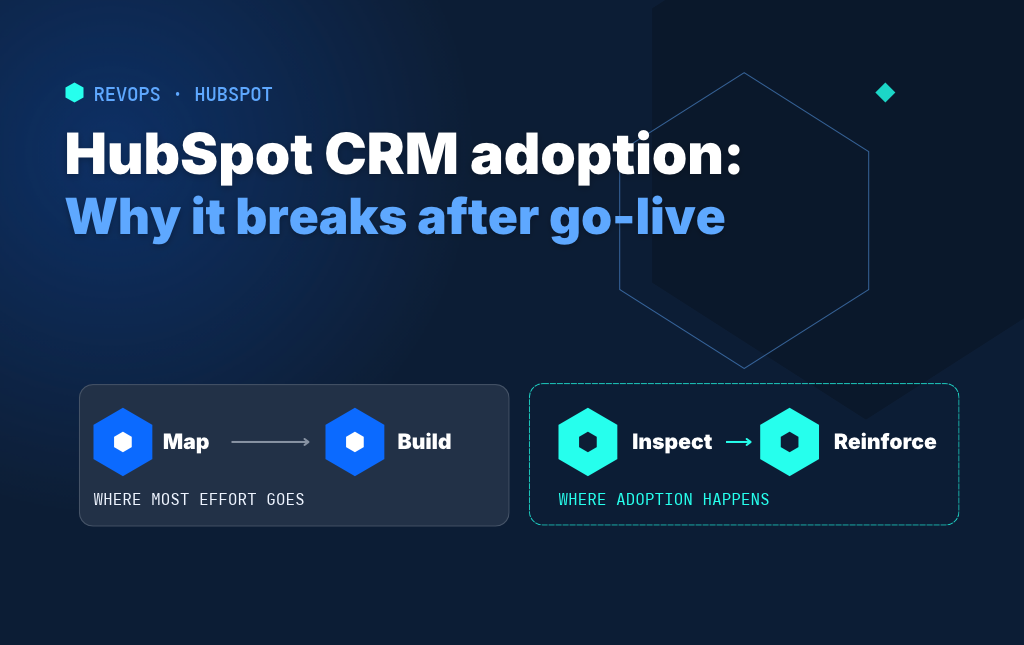
That’s what most teams believe they need. While some initiatives have more dependencies than others, this isn’t where projects break. Josh Curcio, chief revenue officer and partner at Protocol 80, framed the problem well in his HubSpot Unbound session, “Fix CRM Adoption: A Blueprint for Complex Sales Teams,” in September 2026. During the session, Curcio broke CRM adoption into four steps:
- Map: Define the process your team follows.
- Build: Configure that process in HubSpot.
- Inspect: Check where real behavior drifts from what you expected.
- Reinforce: Act on what inspection finds through coaching and system fixes.
According to the session, most teams spend about 80 percent of their energy on the first two steps. Adoption is won or lost in the last two.
The build is visible and easy to scope. You can count pipelines, properties and workflows. Inspection and reinforcement are harder to see, so teams leave them until after launch, and often they never happen. Our HubSpot implementation work puts them in scope from the start.
Why HubSpot portals stall after launch
A portal can be built well and still struggle months later. Three gaps cause it.
No one defined ownership. Every stage needs a named owner for the next move and a clear definition of done. Without both, deals sit idle and reps fill in fields however they see fit.
No one checks where expectations break. Without a view into stalled deals and skipped steps, small misses add up. Over time, the database becomes something nobody trusts.
No one acts on what they find. A dashboard nobody reviews changes nothing. Inspection without reinforcement only documents the decline.
The impact is felt fast. When reps stop trusting the data, they stop using the system. Leadership goes back to spreadsheets. Ultimately, the CRM becomes an expensive record of what used to happen.
How to build inspection and reinforcement into every project
Inspection and reinforcement belong in the project plan from day one, alongside the build and with its own owners and deliverables. We’ve found the following practices make the difference when it comes to CRM project planning.
Define expectations for every stage
Every stage needs a clear requirement, a named owner for, and a clear definition of done. This goes beyond basic traffic directions like telling a rep what to click. Instead, set expectations and explain what needs to happen in the business and who is accountable for it.
Ship hygiene and exception dashboards with go-live
Data hygiene dashboards show the health of your records. They track issues like missing required fields, duplicate contacts, and deals with no recent activity. Exception dashboards surface work that falls outside the expected path. When both launch with the CRM, managers can see where the process breaks in the first week and deploy fixes.
Run post-launch reviews
After launch, review the portal on a set schedule. Each review should accomplish three things: It coaches individual misses, spots patterns across the team, and fixes the system when a pattern points to a design flaw. Sometimes the answer is training. Sometimes it’s a workflow change. The review tells you which.
Go-live is the moment adoption starts. The work after launch decides whether your investment pays off.
What to check in your portal this week
You can test your own CRM portal against this model in a few hours:
- Audit your stage definitions. If a stage lacks an owner and an exit criterion, write both down.
- List the three fields your forecast depends on most. Build a view that shows when they’re missing or stale.
- Schedule a recurring adoption review. Give it an owner and a standing agenda.
If you’re planning a migration, set aside time and budget for inspection and reinforcement before you sign the statement of work. Planning for adoption costs far less than rescuing it later. Our CRM migration guide covers how to scope it.
If your HubSpot portal is live and the data still isn’t trustworthy, our RevOps team can help you identify where adoption is breaking down and build the inspection and reinforcement to fix it. Digital Polygon is a HubSpot Platinum partner with 500+ projects delivered. Talk to our RevOps team to learn more.
Frequently asked questions
What is CRM adoption?
CRM adoption is how consistently your team uses the CRM to run its work. That means logging activity, moving deals through defined stages and relying on the data for forecasts. Strong adoption shows up as complete records, current deal stages and reports leadership trusts enough to act on.
Why do CRM implementations fail after go-live?
CRM implementations usually fail after go-live because teams put most of their effort into mapping and building the process, then leave adoption to chance. Without clear stage ownership, dashboards that show where expectations break, and regular reviews that act on the findings, data quality slips and reps lose trust in the system.
What are the four steps of CRM adoption?
In the framework Josh Curcio presented at HubSpot Unbound 2026, the four steps are map, build, inspect and reinforce. Map defines the process. Build configures it in the CRM. Inspect checks where real behavior drifts from expectations. Reinforce acts on those findings through coaching and system fixes. Adoption depends most on the last two steps, which teams often skip.
What is a data hygiene dashboard in HubSpot?
A data hygiene dashboard is a dashboard built in HubSpot that tracks the health of your CRM records. It flags issues such as missing required fields, duplicate contacts and deals with no recent activity. That lets managers fix data problems before they erode trust in reporting and forecasts.
What should I check in my HubSpot portal after go-live?
Start with three checks. Make sure every pipeline stage has an owner and an exit criterion. Build a view that flags when the three fields your forecast depends on most are missing or stale. Then schedule a recurring adoption review with an owner and a standing agenda.
Who should own CRM adoption after launch?
A named internal owner, usually in RevOps or sales operations, should own CRM adoption after launch. That person runs recurring reviews, watches hygiene and exception dashboards, and decides whether a miss calls for coaching or a system change. A partner can support the reviews, and accountability stays inside the business.
If your HubSpot portal is live and the data still isn’t trustworthy, our RevOps team can help you find where HubSpot adoption breaks and build the inspection and reinforcement to fix it.